
Refund Transaction
What is a Refund?
A refund is the process of returning funds to a customer for an already completed transaction.
A refund occurs when a transaction has already been approved, the payment has been processed, and the funds have been settled into the merchants account. At this stage, the merchant can initiate a refund to return the funds to the customer’s original payment method. Refunds are typically issued when a customer is dissatisfied with a product or service, no longer needs the item, or if there was an issue with the order.
The Companion API enables an MPOS app to initiate full or partial refunds for previous sale transactions directly within the application.
To process a refund, the MPOS App must launch the Ecentric Payment App using an Android Intent call, passing the original transaction UUID to enable full or partial refunds and ensure the card-matching function operates correctly. After initiating the refund, the app should handle the response intent data to determine whether the refund was successful or not.
Note:Should an Integrator not want the Refund matching functionality, the
originalTransactionUuidfield can simply be left blank and an Unmatched Refund transaction will be performed.However, it is highly important to enquire if your Merchant is permitted to process this particular type refund.
How Does a Refund Work?
The below diagram displays an example of how a Refund works by making user of the Companion App (Here after known as MPOS App), Payment App (Here after known as Ecentric's Payment App), Transaction Processor (Here after know as the Ecentric Server) and Acquirer.
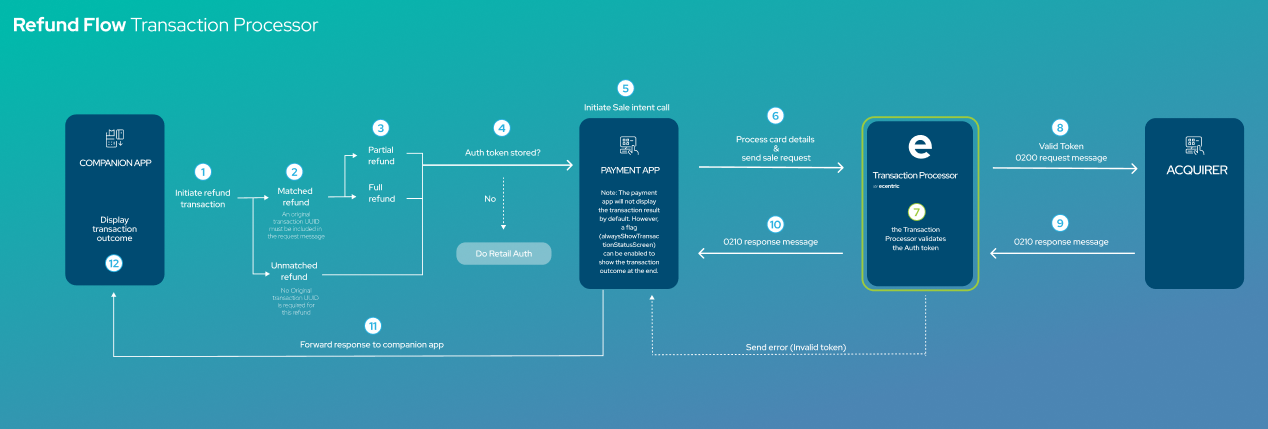
Process Description:
Step 1:
A REFUND request is initiated on the MPOS App.
Step 2:
On the MPOS App, the merchant can either select a transaction from the transaction history to refund (Matched Refund), or process a refund which only contains an amount but no original transaction (Unmatched refund).
Step 3:
Once the method of refund has been selected, the merchant must enter either the full amount of the transaction value (Full refund) or a portion of the original transaction value (Partial refund).
Step4:
The MPOS App will check if an auth token is available in the request.
- If there is an auth token available then the transaction will continue as per normal.
- If there no auth token available, then the MPOS App will need to do a
RETAIL_AUTHrequest in order to obtain a valid auth token, before a refund transaction can be requested.
Step 5:
The Ecentric Payment App will initiate the REFUND request.
Step 6:
The Ecentric Payment App will process the card details and forward the REFUND request to Ecentric's Server.
Step 7:
The Ecentric Server will the validate the Auth token in the request.
NOTE: If the auth token is not validated, the Ecentric Server will return an "invalid auth token" error back to the Ecentric Payment App and the transaction will be aborted.
Step 8:
The Ecentric Server will send a financial message to the Acquirer.
Step 9:
The Acquirer will the perform the necessary checks in order to validate and process the transaction.
Once the validation of the transaction has been performed, the Acquirer will respond with a financial message to the Ecentric Server, which contains the transaction outcome.
Step 10:
The Ecentric server will return the transaction response to the Ecentric Payment App.
Step 11:
The Ecentric Payment App will forward the transaction outcome to the MPOS App.
Step 12:
The MPOS App will be able to display the transaction outcome to the customer.
Request
Note:When a merchant is onboarded, the merchant will be configured for one of the following types of refunds:
- Matched Refund
- Card Unmatched
- Card Matched
- Unmatched Refund
Please see below table indicating the differences between the refund types, and what parameters are required to be sent in the refund request:
Matched Refund Unmatched Refund Card Matched Enabled Card Matched Disabled Mastercard Other Cards Original transaction UUID required X X Original Card required X Original transactionLinkIdentifier required* X Refund cannot exceed the original amount X X X N/A Multiple refunds on original transaction* X X X N/A *The transactionLinkIdentifier is returned in the initial SALE response message. The POS is responsible for storing this value if unmatched refunds need to be processed.
*The total refund amount for all transactions may not exceed the original transaction amount
Sample Bundle: Matched Refund
The following is an example of a MATCHED REFUND request bundle that the MPOS Application will request.
"authenticationKey": "e27b5ce6-8ba6-4746-9453-536728f7cbeb",
"merchantID": "770000000000123",
"launchType": "REFUND",
"originalTransactionUuid": "bdf9d0af-17b3-48ca-8a0b-37dc52bf49bc",
"transactionAmount": 1000
"launchType": "REFUND",
"merchantID": "770000000000123",
"authenticationKey": "e27b5ce6-8ba6-4746-9453-536728f7cbeb",
"transactionAmount": 1000,
"originalTransactionUuid": "bdf9d0af-17b3-48ca-8a0b-37dc52bf49bc",
"merchantName": "Payfacname",
"merchantCity": "Johannesburg",
"merchantRegionCode": "GP",
"merchantCountryCode": "ZA",
"merchantCategoryCode": "4891",
"additionalData": {
"subMid": "574595612358745",
"Street", "cnr Von Willich Ave &, Leonie St",
"City", "Johannesburg",
"Province", "GP",
"Country_Code", "ZA",
"Currency_Code", "710",
"Postal_Code", "0157"
}Sample Bundle: Unmatched Refund (Mastercard)
"authenticationKey": "e27b5ce6-8ba6-4746-9453-536728f7cbeb",
"merchantID": "770000000000123",
"launchType": "REFUND",
"transactionAmount": 1000,
"additionalData": {
  "transactionLinkIdentifier": "1234567890123456789012"
	}
"launchType": "REFUND",
"merchantID": "770000000000123",
"authenticationKey": "e27b5ce6-8ba6-4746-9453-536728f7cbeb",
"transactionAmount": 1000,
"merchantName": "Payfacname",
"merchantCity": "Johannesburg",
"merchantRegionCode": "GP",
"merchantCountryCode": "ZA",
"merchantCategoryCode": "4891",
"additionalData": {
"transactionLinkIdentifier": "1234567890123456789012",
"subMid": "574595612358745",
"Street", "cnr Von Willich Ave &, Leonie St",
"City", "Johannesburg",
"Province", "GP",
"Country_Code", "ZA",
"Currency_Code", "710",
"Postal_Code", "0157"
}Sample Bundle: Unmatched Refund (Other Cards)
"authenticationKey": "e27b5ce6-8ba6-4746-9453-536728f7cbeb",
"merchantID": "770000000000123",
"launchType": "REFUND",
"transactionAmount": 1000
"launchType": "REFUND",
"merchantID": "770000000000123",
"authenticationKey": "e27b5ce6-8ba6-4746-9453-536728f7cbeb",
"transactionAmount": 1000,
"merchantName": "Payfacname",
"merchantCity": "Johannesburg",
"merchantRegionCode": "GP",
"merchantCountryCode": "ZA",
"merchantCategoryCode": "4891",
"additionalData": {
"subMid": "574595612358745",
"Street", "cnr Von Willich Ave &, Leonie St",
"City", "Johannesburg",
"Province", "GP",
"Country_Code", "ZA",
"Currency_Code", "710",
"Postal_Code", "0157"
}Parameters
NoteTo initiate a tokenized refund request, the original sale transaction UUID must be supplied in the refund request call. If the original sale was successfully tokenized, the Ecentric Server will attempt to process the refund request using the previously tokenized card details.
When making use of the tokenized refund, the requesting MPOS application cannot specify which type of refund to initiate.
The following table describes the parameters of the REFUND request message.
| PARAMETER | APPLIES TO | TYPE | DESCRIPTION | EXAMPLE |
|---|---|---|---|---|
| REQUIRED | ||||
| launchType | All | STRING | Must be “REFUND” Used for launching the Ecentric Payment App to process a refund. | REFUND |
| merchantID | All | STRING | The merchant ID assigned to the merchant. The merchant ID will always be the same ID for a specific merchant. To be provided by Ecentric. | 910100000000001 |
| authenticationKey | All | STRING | The authentication token that was generated by the server on a successful login to the Ecentric Payment App. | e27b5ce6-8ba6-4746-9453-536728f7cbeb |
| transactionAmount | All | LONG | The full transaction amount to be charged in cents (long) | 1000 |
| merchantName | PayFac | STRING ALPHANUMERIC WITH SPACES | The store name of the sub-merchant. i.e. Payfacname * ".concat(shopName)) NB: The asterisk must appear in the 4th, 8th, or 13th character position, spaces are counted as characters. | 4th position i.e. "Cla*sh Melrose Arch" 8th position i.e. "Clash *Melrose Arch" 13th position i.e. "Clash Melro*se Arch" |
| merchantCity | PayFac | STRING | The city where the sub-merchant's store is located. | Johannesburg |
| merchantRegionCode | PayFac | STRING | The region code where sub-merchant’s store is located. Must be the Alpha value for the region as seen in example column. EC – Eastern Cape FS – Free State GP – Gauteng KZN – KwaZulu-Natal LP – Limpopo MP – Mpumalanga NC – Northern Cape NW – North West WC – Western Cape | GP |
| merchantCountryCode | PayFac | STRING | The country code where sub-merchant's store is located. | ZA |
| merchantCategoryCode | PayFac | STRING | The category code of the sub-merchant's. 4-digit numeric code that identifies the type of business or service a sub-merchant provides. NB: It is essential that this field is populated accurately, as incorrect MCC assignment per merchant may result in penalties. | 4891 |
| OPTIONAL | ||||
| originalTransactionUuid | All | STRING ALPHANUMERIC | Supplying the original sale UUID will initiate a matched refund. If the original sale was tokenized, the refund will be processed via the previously tokenized card holder details. | bdf9d0af-17b3-48ca-8a0b-37dc52bf49bc |
| merchantName | NON PayFac | STRING ALPHANUMERIC WITH SPACES | The name of the merchant that requested the transaction, as stored at the bank. | Merchant A |
| transactionDescription | All | STRING ALPHANUMERIC WITH SPACES | Reference number for the merchant’s records. If transactionDescription field is left blank in the request, Ecentric will automatically generate/populate the field with the RRN value for the transaction. | 3tf party app desc |
| transactionReferenceNo | All | STRING ALPHANUMERIC | Reference number field that also apperas in a merchant portal when available. | ref#123456 |
| cellNumberToSMSReceipt | All | STRING NUMERIC | 0-digit cell phone number for receipt SMS destination. Can be blank.
| 0721234567 |
| emailAddressToSendReceipt | All | ALPHANUMERIC | Valid email address for receipt email destination. Can be blank. NOTE: If isReceiptRequired is true then this is a mandatory field. | [email protected] |
| isReceiptRequired | All | BOOLEAN | If set to true, at least one of the receipt parameters above needs to be set. NOTE: According to VISA and MasterCard requirements, this must always be set to true unless the app developer is providing an alternative means to send a receipt. | true |
| alwaysShowTransactionStatusScreen | All | BOOLEAN | Once the Ecentric Payment App has processed a transaction there is a status screen that shows the success/failure of processing. Set this flag to true if you would like this displayed otherwise false to hide it. Default is false. | true |
| externalSTAN | All | STRING NUMERIC | An optional systems trace number generated by some 3rd party ERP systems. | 123456 |
| externalRRN | All | STRING ALPHANUMERIC | A RRN generated by some 3rd party ERP systems. If externalRRN field is left blank in the request, Ecentric will automatically generate an externalRRN for the transaction. | ABCDEF123456 |
| externalTransactionGUID | All | STRING ALPHANUMERIC | A GUID that identifies a specific transaction generated by 3rd party ERP systems. | 2fdca02f-3cbe-4e8c-82ad-86a1a16b72e8 |
| externalInvoiceGUID | All | STRING ALPHANUMERIC | A GUID that identifies a particular invoice that may appear on more than one transaction. | 2fdca02f-3cbe-4e8c-82ad-86a1a16b72e9 |
| transactionUuid | All | STRING ALPHANUMERIC | Unique ID of transaction. If transactionUuid field is left blank in the request, Ecentric will automatically generate a transactionUuid for the transaction. | bdf9d0af-17b3-48ca-8a0b-37dc52bf49bc |
| externalTransactionDateTime | All | STRING | An optional date and time the transaction was generated on the 3rd party ERP systems. Has the format of “yyyy-MM-dd'T'HH:mm:ss” | 2017-04-28T09:30:00 |
| externalTerminalId | All | STRING NUMERIC | An optional terminal identifier for device configured on the 3rd party ERP system If externalTerminalId field is left blank in the request, Ecentric will automatically send the payment device TerminalId in the externalTerminalId field for the transaction. | 98100010 |
| latitude | All | STRING NUMERIC | An optional geolocation identifier indicating the latitude position of the device | -28.1619942 |
| longitude | All | STRING NUMERIC | An optional geolocation identifier indicating the longitude position of the device | 30.2350981 |
| accuracy | All | STRING NUMERIC | An optional accuracy indicator of the geolocation | |
| additionalData | All | OBJECT | See Additional Parameters section for the AdditionalData Object. | N/A |
Additional Parameters
Note
- The 'additionalData' object allows the MPOS App to pass data fields of any type to the server.
- This 'additionalData' object is NOT interrogated or used by the Ecentric Payment App itself, but only passes the object through to the server.
AdditionalData Object
The following tables describes the additional parameters of the REFUND request message.
| PARAMETERS | APPLIES TO | TYPE | SIZE(MAX) | DESCRIPTION | EXAMPLE |
|---|---|---|---|---|---|
| REQUIRED | |||||
| merchantInfo | PayFac | OBJECT | N/A | See parameters under MerchantInfo Object. example included in Payfac Sample Code REFUND Request | N/A |
| subMid | PayFac | NUMERIC STRING | 15 | The unique ID for each sub merchant. Determined by the PayFac. example included in Payfac Sample Code REFUND Request | 574595612358745 |
| transactionLinkIdentifier Mastercard Unmatched Refunds Only | All | OBJECT | N/A | It is MANDATORY for the POS to send the transactionLinkIdentifier field when sending an unmatched refund request. example included in code Sample Code UNMATCHED REFUND Request | 1234567890123456789012 |
MerchantInfo Object
| PARAMETERS | APPLIES TO | TYPE | SIZE(MAX) | DESCRIPTION | EXAMPLE |
|---|---|---|---|---|---|
| Street | PayFac | STRING ALPHANUMERIC WITH SPACES | 255 | The unique street address of the sub-merchant. | cnr Von Willich Ave &, Leonie St |
| City | PayFac | STRING ALPHANUMERIC | 48 | The city where the sub-merchant's store is located. | Johannesburg |
| Province | PayFac | STRING ALPHANUMERIC | 2 | The province where the sub-merchant's store is located. Must be the Alpha value for the province as seen in example column. EC – Eastern Cape FS – Free State GP – Gauteng KZN – KwaZulu-Natal LP – Limpopo MP – Mpumalanga NC – Northern Cape NW – North West WC – Western Cape | GP |
| Country_Code | PayFac | STRING NUMERIC | 2 | The country code where the sub-merchant's store is located. | ZA |
| Currency_Code | PayFac | STRING NUMERIC | 3 | The currency code that the sub-merchant uses to define the transaction currency. Currency code based on the ISO 8583 standard. | 710 |
| Postal_Code | PayFac | STRING NUMERIC | 4 | The postal code where the sub-merchant's store is located. | 0157 |
Sample Code: Matched Refund
The following code needs to be implemented by the MPOS Application in order to invoke the Ecentric Payment App to initiate a REFUND request message.
*See Sample Code REFUND Response for the intentLauncher function
private void doRefund() {
    Intent intent = new Intent();
    intent.setClassName("com.ecentric.ecentricpay", "com.ecentric.ecentricpay.MainActivity");
    Bundle dataBundle = new Bundle();
    dataBundle.putString("launchType", "REFUND");
    dataBundle.putString("merchantID", "910100000000001");
  	dataBundle.putString("authenticationKey", "received_authenticationKey");
		dataBundle.putString("originalTransactionUuid", "bdf9d0af-17b3-48ca-8a0b-37dc52bf49bc");
    dataBundle.putLong("transactionAmount", 1000); // amount in cents

    intent.putExtra("ecentricBundle", dataBundle);
    try {
        intentLauncher.launch(intent);
    } catch (Exception e) {
        Log.e(TAG, "Error launching intent: " + e);
    }
}
private void doRefund() {
Intent intent = new Intent();
intent.setClassName("com.ecentric.ecentricpay", "com.ecentric.ecentricpay.MainActivity");
Bundle dataBundle = new Bundle();
dataBundle.putString("launchType", "REFUND");
dataBundle.putString("merchantID", "910100000000001")
dataBundle.putString("authenticationKey", "received_authenticationKey");
dataBundle.putString("merchantName", "Cla*sh Melrose Arch");
dataBundle.putString("merchantCity", "Johannesburg");
dataBundle.putString("merchantRegionCode", "GP"
dataBundle.putString("merchantCountryCode", "ZA");
dataBundle.putString("merchantCategoryCode", "4891");
dataBundle.putString("originalTransactionUuid", "bdf9d0af-17b3-48ca-8a0b-37dc52bf49bc");
dataBundle.putLong("transactionAmount", 1000); // amount in cents
JSONObject additionalData = new JSONObject();
try {
// Add subMid field
additionalData.put("subMid", "574595612358745");
// Create a merchantInfo object
JSONObject merchantInfo = new JSONObject();
merchantInfo.put("Street", "cnr Von Willich Ave &, Leonie St);
merchantInfo.put("City", "Johannesburg");
merchantInfo.put("Province", "GP");
merchantInfo.put("Country_Code", "ZA");
merchantInfo.put("Currency_Code", "710");
merchantInfo.put("Postal_Code", "0157");
additionalData.put("Merchant_Info", merchantInfo);
dataBundle.putString("additionalData", additionalData.toString());
} catch (JSONException e) {
e.printStackTrace();
}
intent.putExtra("ecentricBundle", dataBundle);
try {
intentLauncher.launch(intent);
} catch (Exception e) {
Log.e(TAG, "Error launching intent: " + e);
}Sample Code: Unmatched Refund (Mastercard)
private void doRefund() {
    Intent intent = new Intent();
    intent.setClassName("com.ecentric.ecentricpay", "com.ecentric.ecentricpay.MainActivity");
    Bundle dataBundle = new Bundle();
    dataBundle.putString("launchType", "REFUND");
    dataBundle.putString("merchantID", "910100000000001");
    dataBundle.putString("authenticationKey", "received_authenticationKey");
    dataBundle.putLong("transactionAmount", 1000); // amount in cents

		JSONObject additionalData = new JSONObject();
		try {

    // Add transactionLinkIdentifier field
    additionalData.put("transactionLinkIdentifier", "1234567890123456789012");

    dataBundle.putString("additionalData", additionalData.toString());
		} catch (JSONException e) {
			e.printStackTrace();
		}

    intent.putExtra("ecentricBundle", dataBundle);
    try {
        intentLauncher.launch(intent);
    } catch (Exception e) {
        Log.e(TAG, "Error launching intent: " + e);
    }
}
private void doSale() {
Intent intent = new Intent();
intent.setClassName("com.ecentric.ecentricpay", "com.ecentric.ecentricpay.MainActivity");
Bundle dataBundle = new Bundle();
dataBundle.putString("launchType", "REFUND");
dataBundle.putString("merchantID", "910100000000001")
dataBundle.putString("authenticationKey", "received_authenticationKey");
dataBundle.putString("merchantName", "Cla*sh Melrose Arch");
dataBundle.putString("merchantCity", "Johannesburg");
dataBundle.putString("merchantRegionCode", "GP"
dataBundle.putString("merchantCountryCode", "ZA");
dataBundle.putString("merchantCategoryCode", "4891");
dataBundle.putLong("transactionAmount", 1000); // amount in cents
JSONObject additionalData = new JSONObject();
try {
// Add transactionLinkIdentifier field
additionalData.put("transactionLinkIdentifier", "1234567890123456789012");
// Add subMid field
additionalData.put("subMid", "574595612358745");
// Create a merchantInfo object
JSONObject merchantInfo = new JSONObject();
merchantInfo.put("Street", "cnr Von Willich Ave &, Leonie St);
merchantInfo.put("City", "Johannesburg");
merchantInfo.put("Province", "GP");
merchantInfo.put("Country_Code", "ZA");
merchantInfo.put("Currency_Code", "710");
merchantInfo.put("Postal_Code", "0157");
additionalData.put("Merchant_Info", merchantInfo);
dataBundle.putString("additionalData", additionalData.toString());
} catch (JSONException e) {
e.printStackTrace();
}
intent.putExtra("ecentricBundle", dataBundle);
try {
intentLauncher.launch(intent);
} catch (Exception e) {
Log.e(TAG, "Error launching intent: " + e);
}Sample Code: Unmatched Refund (Other Cards)
private void doRefund() {
    Intent intent = new Intent();
    intent.setClassName("com.ecentric.ecentricpay", "com.ecentric.ecentricpay.MainActivity");
    Bundle dataBundle = new Bundle();
    dataBundle.putString("launchType", "REFUND");
    dataBundle.putString("merchantID", "910100000000001");
    dataBundle.putString("authenticationKey", "received_authenticationKey");
    dataBundle.putLong("transactionAmount", 1000); // amount in cents

    intent.putExtra("ecentricBundle", dataBundle);
    try {
        intentLauncher.launch(intent);
    } catch (Exception e) {
        Log.e(TAG, "Error launching intent: " + e);
    }
}
private void doSale() {
Intent intent = new Intent();
intent.setClassName("com.ecentric.ecentricpay", "com.ecentric.ecentricpay.MainActivity");
Bundle dataBundle = new Bundle();
dataBundle.putString("launchType", "REFUND");
dataBundle.putString("merchantID", "910100000000001")
dataBundle.putString("authenticationKey", "received_authenticationKey");
dataBundle.putString("merchantName", "Cla*sh Melrose Arch");
dataBundle.putString("merchantCity", "Johannesburg");
dataBundle.putString("merchantRegionCode", "GP"
dataBundle.putString("merchantCountryCode", "ZA");
dataBundle.putString("merchantCategoryCode", "4891");
dataBundle.putLong("transactionAmount", 1000); // amount in cents
JSONObject additionalData = new JSONObject();
try {
// Add subMid field
additionalData.put("subMid", "574595612358745");
// Create a merchantInfo object
JSONObject merchantInfo = new JSONObject();
merchantInfo.put("Street", "cnr Von Willich Ave &, Leonie St);
merchantInfo.put("City", "Johannesburg");
merchantInfo.put("Province", "GP");
merchantInfo.put("Country_Code", "ZA");
merchantInfo.put("Currency_Code", "710");
merchantInfo.put("Postal_Code", "0157");
additionalData.put("Merchant_Info", merchantInfo);
dataBundle.putString("additionalData", additionalData.toString());
} catch (JSONException e) {
e.printStackTrace();
}
intent.putExtra("ecentricBundle", dataBundle);
try {
intentLauncher.launch(intent);
} catch (Exception e) {
Log.e(TAG, "Error launching intent: " + e);
}Response
Sample Bundle
NoteThe originalTransactionUuid field will be blank if no originalTransactionUuid was in the Refund request.
This however does not mean that you as the merchant will be able to process the refund transaction if you as the Merchant are not enabled for processing Unmatched Refunds on the payment device.
The following is an example of a REFUND response bundle that the MPOS Application will receive.
  "adjustAmount": -1000,
  "appVersion": "2.2.0",
  "buildInfo": "com.ecentric.ecentricpay-DEBUG-Ecentric-[Ecentric_TEST]",
  "cashAmount": 0,
  "isReceiptDataAvailable": true,
  "launchType": "REFUND",
  "merchantID": "910100000000001",
  "outstandingAmount": 0,
  "posId": "",
  "receiptBundle": { Please see receipt bundle section
  },
  "resultCode": "01",
  "resultDescription": "APPROVED",
  "serialNumber": "PC05P2CG10036",
  "transactionAmount": 1000,
  "transactionLinkIdentifier": "1234567890123456789012",
  "transactionUuid": "cd14a381-32a7-4dfd-92f6-d73f7324055d",
  "txType": "REFUND"
Parameters
The following table describes the parameters of the REFUND response message.
| PARAMETERS | TYPE | DESCRIPTION | EXAMPLE |
|---|---|---|---|
| adjustAmount | LONG | N/A for Refunds | 0 |
| appVersion | STRING | The software version currently running on the Ecentric Payment App. | 2.0.0 |
| buildInfo | STRING | Metadata that identifies the specific software build running on the payment device. | com.ecentric.ecentricpay-DEBUG-Ecentric-[Ecentric_UAT] |
| cashAmount | LONG | N/A for Refunds | 0 |
| isReceiptDataAvailable | STRING | Boolean indicating whether a receiptBundle object is available. Will always be included for approved or declined transactions. | true |
| launchType | STRING | Echo of the launchType used to launch the Ecentric Payment App. | REFUND |
| merchantID | STRING | Echo of the merchantID used in the request. | 910100000000001 |
| outstandingAmount | LONG | N/A for Refunds | 0 |
| posId | STRING | N/A for Companion API Integrations | |
| receiptBundle | STRING | Consists of a sub-bundle of server parameters that can be used by the partner application to create a receipt. | See Receipt Bundle Section |
| resultCode | STRING | Represents the final outcome of the transaction. ● 01: SUCCESSFUL | 01 |
| resultDescription | STRING | A user readable representation of the above resultCode i.e. Approved for 01 resultCode. If the bank or switch approves or declines the transaction, the response description is included in this field. | APPROVED |
| serialNumber | STRING | The serial number for the device that was used for the RETAIL_AUTH intent call. | PC05P2CG10036 |
| transactionAmount | LONG | Approved total transactionAmount. | 1000 |
| transactionLinkIdentifier | STRING | Mastercard Only Echo of the original transaction transactionLinkIdentifier. | 1234567890123456789012 |
| transactionUuid | STRING | Echo of the Unique ID of a transaction. | bdf9d0af-17b3-48ca-8a0b-37dc52bf49bc |
| txType | STRING | Transaction type | REFUND |
Sample Code
The following code needs to be implemented by the MPOS Application to recover the REFUND transaction outcome and resume the MPOS App flow accordingly.
When the response is returned the calling app needs to override the onActivityResult() method and can be done as follows:
private final ActivityResultLauncher<Intent> intentLauncher = registerForActivityResult(
       new ActivityResultContracts.StartActivityForResult(),
       result -> {
           if (result.getResultCode() == Activity.RESULT_OK) {
               Intent data = result.getData();
               if (data != null) {
                   Bundle responseBundle = new Bundle(data.getBundleExtra("ecentricApplicationResponse"));
                   String launchType = responseBundle.getString("launchType");
                   String resultCode = responseBundle.getString("resultCode");
                 		// Determine if the transaction was successfully executed using returned resultCode
										// 00 = Completed
										// 01 = Transaction successful
                   Boolean success = false;
                   if (resultCode != null && (resultCode.matches("00") || resultCode.matches("01"))) {
                       success = true;
                   }

                   if (responseBundle.get("errorBundle") != null) {
                       Bundle errorBundle = new Bundle(responseBundle.getBundle("errorBundle"));
                   }
               }
           } else {
               Log.e(TAG, "Received error resultCode: " + result.getResultCode());
           }
       }
);
Error Handling
The following table contains typical errors that might occur and how to handle these errors:
| ERROR MESSAGE | SOLUTION |
|---|---|
| Incorrect merchantID | Ensure that you have entered the correct merchantID. |
| authenticationKey is invalid | When your authenticationKey is invalid, you will receive an error message indicating that the authenticationKey is invalid, a RETAIL_AUTH request needs to be done to obtain a valid authenticationKey. |
| transactionAmount not present | Ensure that you are sending through a valid transactionAmount. |
Sample Bundle
The following is an example of a REFUND ERROR response bundle that the MPOS Application will receive.
"resultDescription": "ABORTED",
"errorBundle": {
    "description": "ERROR",
    "reference": "",
    "errorType": "TRANSACTION",
    "message": "Transaction cancelled by user"
  },
"buildInfo": "Ecentric_DEBUG_Ecentric_INT",
"isReceiptDataAvailable": false,
"resultCode": "03",
"merchantID": "910100000000001",
"serialNumber": "PC05P2CG10036",
"launchType": "REFUND",
"cashAmount": 0,
"appVersion": "1.9.8",
"transactionAmount": 1000
Updated 5 months ago