
3D Secure
3D Secure is a security protocol that adds an extra layer of customer authentication to online credit and debit card transactions, helping to reduce fraud.
The Secure3DLookup API method abstracts the complexity of the underlying details of the interaction with the bank's Access Control Server (ACS) so that merchants are only required to provide the essential information needed for customer authentication.
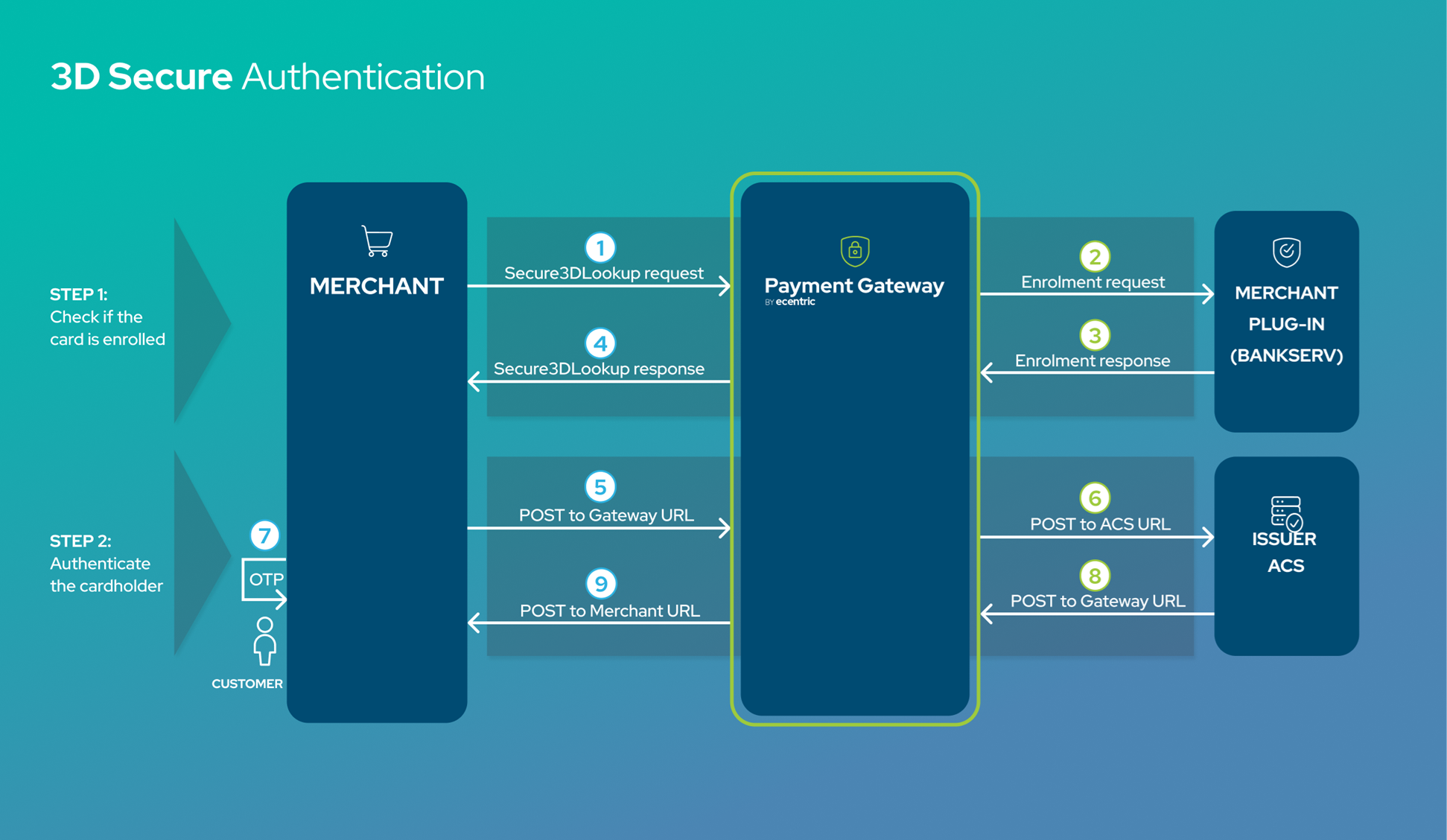
Step 1: Check if the card is enrolled
The first step is to query if the customer's card is enrolled for 3D Secure by using the Secure3DLookup method.
Important request parameters:
ReconIDis the reference number for the transaction and is used to tie the 3DS request to the payment. If a merchant does not supply the ReconID then the TransactionID (required) will be sent as the MD value to the ACS.TermURL(required) this is the URL of the merchant’s website where the customer will be redirected after the authentication process is completed by the bank.
Important response parameters:
Enrolledis a boolean true/false value that indicates if the customer's card is enrolled.AcsUrlis used in the next step to POST a request to the ACS to authenticate a customer.PAReqPayloadcontains the payload value that is sent to the ACS in the next step.MdStatuscontains an important code that indicates the status of a 3D Secure authentication process and if applicable, what the next steps should be.
Step 2: Authenticate the cardholder
If the card is not enrolled (Enrolled = false), then a merchant should not proceed with the transaction unless they are willing to take on the financial liability for the transaction in the event of fraud or charge-back.
An full example of the Secure3DLookup Response can be found here
If the card is enrolled for 3DS (i.e. Enrolled= true):
<ResponseDetail>
  <Source>3DSecure</Source>
  <Code>50</Code>
  <Description>3DS Method</Description>
  <ClientMessage>Success. Please provide TDSMethodContent</ClientMessage>
</ResponseDetail>
<Enrolled>true</Enrolled>
<AcsUrl>https://uat.ecentric.co.za/HPP/tds2/process</AcsUrl>		<PAReqPayload>eyJhbGciOiJIUzI1NiIsInR5cCI6IkpXVCJ9.eyJ0eElkIjoiMTM4NDc1</PAReqPayload>
<MdStatus>50</MdStatus>
The MdStatus is returned in <MdStatus></MdStatus>
- If MdStatus = 1 (Authenticated) then a merchant can proceed straight to performing an authorization or payment.
- If MdStatus = 9 or 50 (or in rare cases 4) then a merchant should redirect the cardholder to the AcsUrl for authentication by performing an HTML form POST request.
Example of cardholder authentication HTML POST:Note:<HTML> <BODY onload="document.frmLaunch.submit();"> <FORM name="frmLaunch" method="POST" action="ACSUrl Value"> <input type=hidden name="PaReq" value="Payload Value"> </FORM> </BODY> </HTML>- The action attribute is populated with the value in the
AcsUrlelement in the Secure3DLookup response message. - The PaReq is populated with the value in the
PAReqPayloadelement. - Other MdStatuses indicate various failure states as described below in the MD Status list.
- Where liability remains with the merchant, the merchant is advised to not proceed with an Authorize or Payment
- The action attribute is populated with the value in the
Once the cardholder has been authenticated, the ACS will perform a POST to the merchant's website specified by the TermURL with the following parameters:
PAResthis value is required in thePAResPayloadof the subsequent Authorize or Payment request.MDthis is the merchant data which is populated by theReconIdreturned by the ACS that allows the merchant to tie the request/response pairs together.
Authorization Matrix
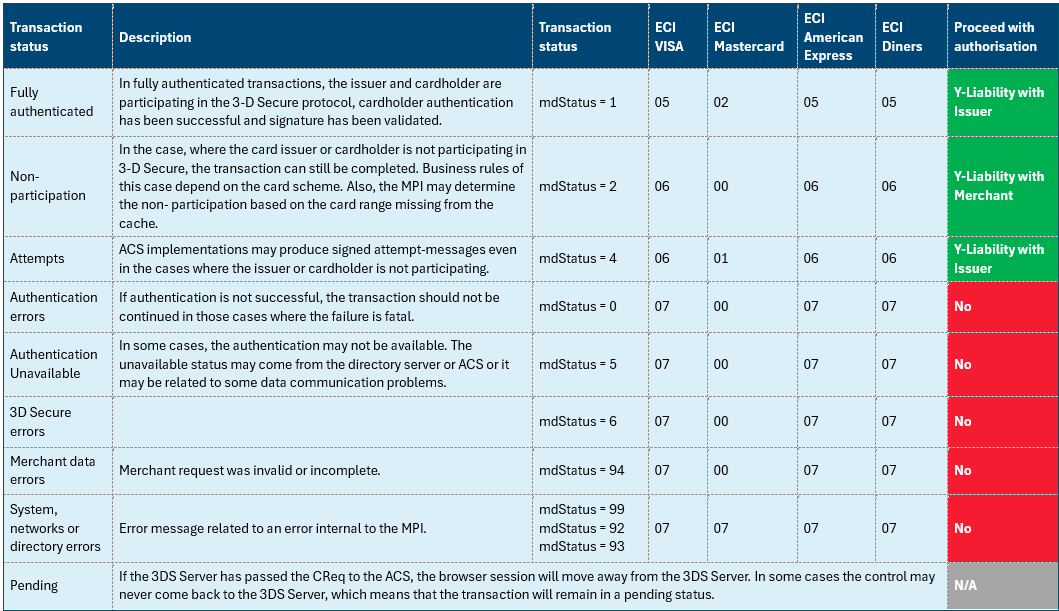
An Electronic Commerce Indicator (ECI) is included in the response from Bankserv and is used to determine the final status of the transaction. (These can be found on the Online Payments Portal under the 3D Secure Details tab in Transaction Management).
Please take note of the following authentication scenarios where the liability is tabulated below. Liability is subject to change based on the card scheme.
MD Status List
|
MDStatus |
Description |
Liability Shift to the merchant |
|
0 - Not Authenticated |
Cardholder did not finish the 3DSecure procedure successfully |
Yes |
|
1 - Authenticated |
Cardholder successfully authenticated. |
No |
|
2,3 - Not participating |
Cardholder not enrolled in 3DSecure or issuer of the card is not participating in 3DSecure |
Yes |
|
4 - Attempt |
3DSecure attempt recognized by card issuer. |
No |
|
5 - Authentication unavailable |
Issuer is unable to process 3DSecure request. Merchant can decide to continue with transaction if merchant considers risk as low. |
Yes |
|
6 - 3DSecure error |
Invalid field in 3-D Secure message generation, error message received or directory server fails to validate the merchant. |
Yes |
|
7 - MPI/Our error |
Error occured on MPI side, this may happen when the input data is invalid, this may also be returned if the MPI does not support 3DSecure for the particular card brand. |
Yes |
|
8 - Fraud score block |
3DS attempt was blocked by MPI |
Yes |
|
9 - Pending |
MdStatus in enrollment response when merchant should start 3DSecure procedure. |
N/A |
|
50 - In 3DS Method |
An extra authentication step is required before 3DSecure procedure is started. |
N/A |
|
83 - Proxy script error |
The proxy script encountered an error. |
Yes |
|
91 - Network error |
Network error, connection to directory server times out. |
Yes |
|
92 - Directory error |
Directory response read timeout or other failure. |
Yes |
|
93 - Configuration error |
Service is disabled, invalid configuration, etc. |
Yes |
|
94 - Input error |
Merchant request had errors |
Yes |
|
95 - No directory error |
No directory server found configured for PAN/card type. |
Yes |
|
97 - Unable to locate live transaction |
Unable to locate live transaction, too late or already processed. |
Yes |
|
96 - No directory error |
No version 2 directory server found configured for PAN/card type and flow requires version 2 processing. |
Yes |
|
99 - System error |
System error |
Yes |
Updated about 1 month ago